
Guide
What is a flowchart? Meaning, types and how to make one
A flowchart is a diagram that shows the steps, decisions and order of a process with standard shapes joined by arrows. Ovals mark the start and end, rectangles are actions, diamonds are yes/no questions, and arrows show what happens next.
What is a flowchart?
A flowchart maps how a piece of work moves from start to finish. Each box is a step, each arrow leads to the next one, and the path splits at every decision. It works the same for an order process, an algorithm or a support chat. You'll also see it written as flow chart, or called a flow diagram, process map or workflow diagram; drawing one is called flowcharting.
The idea dates back to 1921, when Frank and Lillian Gilbreth presented their process charts. The symbols were standardized later, and ISO 5807 is still the usual reference.
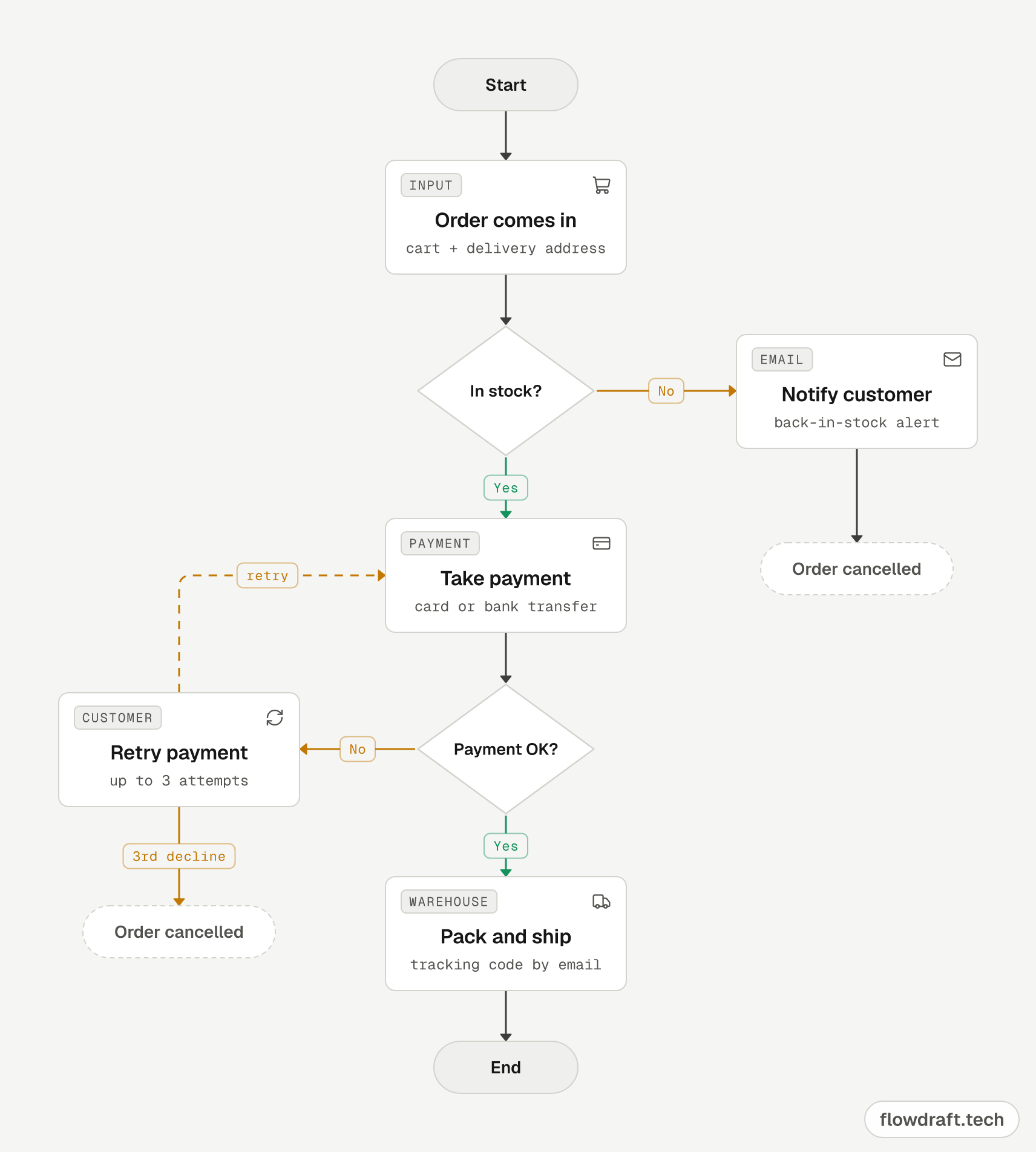
Here's a typical example, an online shop's order process, read from top to bottom:
What are flowcharts used for?
A flowchart makes you ask “what happens next?” and “what if it doesn't?” at every step, and it gives everyone involved the same picture.
- Business processes: approvals, hiring, refunds: who does what, in which order.
- Teaching: working out an algorithm before writing code, like checking whether a number is odd or even.
- Software: sign-in, checkout or error-handling logic that developers, designers and product managers can all read.
- Support and chatbots: where a conversation or a bot goes after each answer.
- Process improvement: spotting bottlenecks, extra approvals and duplicated work.
Skip it when the order doesn't matter (a mind map fits better) or when the task never branches (a checklist will do).
Types of flowcharts
| Type | What it shows | Example |
|---|---|---|
| Process flowchart | One process's steps and decisions, in order | Online order, refund |
| Swimlane (cross-functional) flowchart | A process split into lanes by person, team or system | Leave approval, purchasing |
| Workflow diagram | Tasks, approvals and handoffs between people or tools | Document approval, automation |
| Data flow diagram (DFD) | How data moves between systems and data stores | Form → server → database |
| Program flowchart (algorithm) | Program logic: conditions, loops, input and output | Odd or even, largest of three numbers |
| User flow / conversation flow | A user's path through screens or messages | Sign-up flow, chatbot script |
Data flow diagrams have their own notation (processes, data stores, external entities). All the other types use the symbols below.
Some textbooks list four types instead: document, data, system and program flowcharts, named after what each one follows: paper documents, data, the parts of a system, or the logic of a program.
The 6 shapes you need to read a flowchart
ISO 5807 defines more than 20 shapes, but most flowcharts need only these six:
Start / End (terminal)
An oval marking where the flow starts and where it ends.
In flowdraft: The Start / End part. Rename it “Start”, “End” or “Order cancelled”.
Process (step)
An action, such as “Take payment”. Drawn as a rectangle.
In flowdraft: A Step card: a short title, details in the subtitle, the actor in the tag.
Decision
A yes/no question. Two or more labeled arrows leave the diamond.
In flowdraft: The Decision part. Type the question and label its arrows “Yes” and “No”.
Input / output
Data coming in or going out, like reading user input or showing a result. Drawn as a parallelogram.
In flowdraft: There's no parallelogram shape. Use a Step card tagged INPUT or OUTPUT, with a pen or screen icon.
Flowline (arrow)
Shows the order and direction of the steps, usually top to bottom or left to right.
In flowdraft: Drag from a dot on a box's edge to another box. Select the arrow to change its line, color or label.
Connector
A small lettered circle that links to another point on the same page instead of a long, crossing arrow.
In flowdraft: There's no circle shape. Put a Chip with the same letter (say, “A”) at both ends.
For document, database, delay and the other shapes, see the full guide to flowchart symbols.
Common flowchart examples
A flowchart looks the same whatever it describes; only the text in the boxes changes. These are the examples people draw most:
- Algorithms: the flowchart to find the largest of three numbers, an even or odd check, the sum of the numbers from 1 to N and the factorial, the classic exercises in programming classes.
- Business processes: the online order flowchart at the top of this page, an e-commerce order and shipping process and the leave approval swimlane further down.
- Software and support: a login and password reset flow or a support ticket handed from a chatbot to a person.
Each one is explained step by step and opens in the editor with one click. See all nine in flowchart examples.
How to make a flowchart
A good flowchart starts before you draw. A few minutes of planning saves a lot of box shuffling later.
1. Plan the process first
- Set the boundaries: what starts the process and what ends it? Say, from “order comes in” to “parcel shipped”.
- Write steps as verbs: “Take payment”, “Check stock”.
- Find the exceptions: at each step, ask “what if not?” Out of stock? Card declined? No reply from the manager?
- Note who does what: several people or teams means you'll want swimlanes.
2. Draw a flowchart online in flowdraft
- Open the free online flowchart maker. No account needed: your drawing is kept on your device as a draft. For a head start, pick a template under File → New flow.
- Drag Start / End from the left panel onto the canvas, or click it. On phones and narrow screens (such as a tablet in portrait), tap Add at the bottom.
- Add a Step for each action and a Decision for each question. Double-click a box (or select it and press Enter) to edit its text, or use the panel on the right.
- Connect two boxes by dragging from a dot on one box's edge to a dot on the other.
- Select each arrow leaving a decision and type “Yes” or “No” in the Label field. A green main path and orange exceptions make the chart quicker to read.
- For several roles, add a Lane from the Layout group, name it (say, “MANAGER”) and move the cards into it. Lanes always stay behind your boxes.
- Save to your free account, then use Export to download a PNG image, an SVG vector or editable JSON. Saving and exporting require signing in.
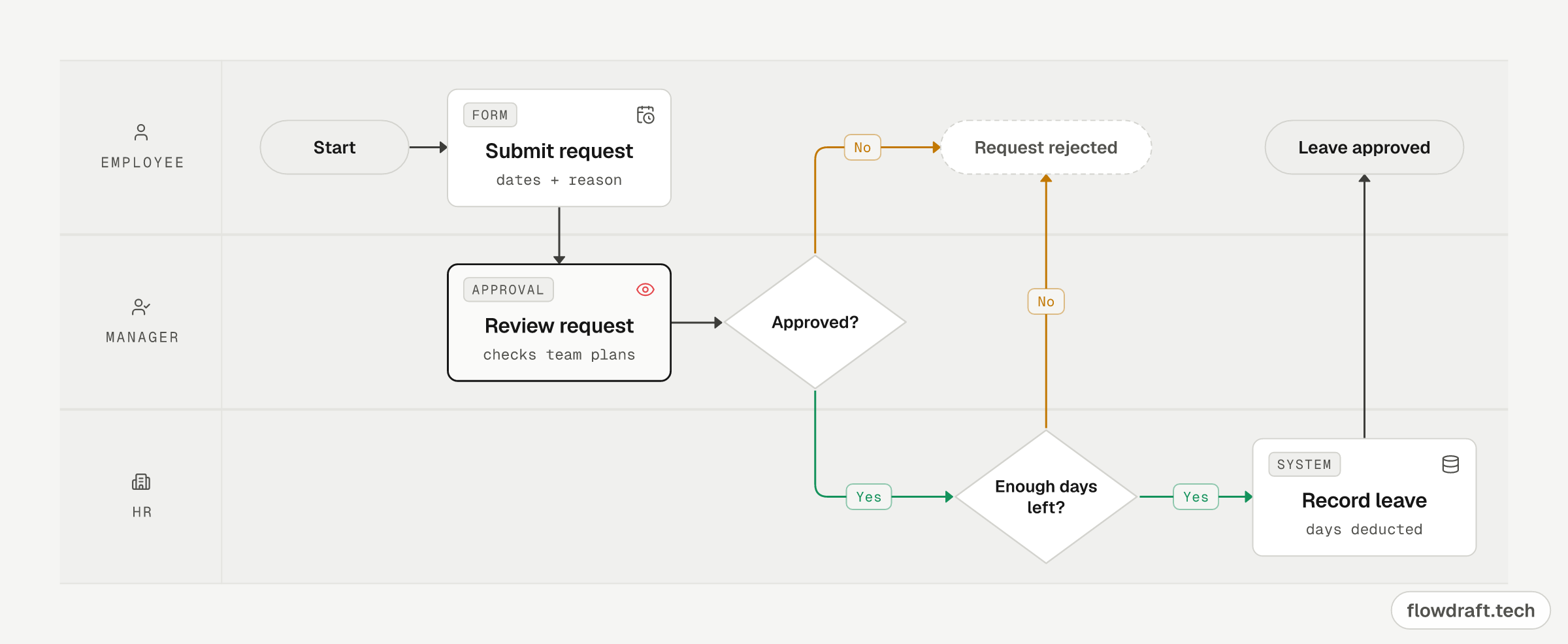
Example: a swimlane flowchart for leave approval
Each lane is a role, so an arrow crossing into another lane means the work changes hands. The manager's review uses the Gate card style, which marks human approval steps.
Flowchart best practices and common mistakes
- Pick one direction. Top to bottom or left to right; only loops go backwards.
- One box, one action. “Create and send the invoice” is two steps.
- Label every branch that leaves a decision; unlabeled branches leave readers guessing.
- Leave no dead ends. Cancel, error and timeout paths need an end too.
- Limit loops. Note how many retries are allowed, or for how long.
- Avoid crossing lines. Rearrange the boxes first; use a connector if that fails.
- Split big diagrams. Past 15–20 boxes, break the process into sub-processes.
Choosing a flowchart maker
You can draw a flowchart on paper, in office software or in a dedicated editor. Each has its place:
| Tool | Good for | Keep in mind |
|---|---|---|
| Pen and paper | The fastest first draft | Hard to edit and share |
| Word / PowerPoint | Already installed; goes straight into documents and slides | Shapes are aligned by hand, which gets tedious as charts grow |
| Visio / draw.io | Full symbol libraries, detailed technical diagrams | Visio is paid; both take time to learn |
| Canva / Miro | Templates and live team collaboration on a shared board | Flowcharts are one feature of a larger tool; some features need a paid plan |
| flowdraft | Free, no account needed, works on phones; ready-made parts; AI over MCP | Not every ISO shape (no parallelogram); no real-time co-editing |
Pick by the job: a whiteboard for brainstorming, Visio or draw.io for engineering detail, flowdraft for a clean process flow drawn and shared quickly.
Make a flowchart with AI
Add the flowdraft MCP server to ChatGPT, Claude, Claude Code, Cursor or VS Code, sign in and approve access, and your assistant can read, create and edit the diagrams in your account. Claude and ChatGPT show a picture of the result in the chat, with a link that opens it in the editor. See the ChatGPT flowchart guide or the MCP setup page for setup.
Start drawing
Browse more flowchart examples or watch the 30-second tour. Your first flowchart doesn't even need an account.
Frequently asked questions
What is a flowchart in simple words?
A picture of a process: boxes for the steps, diamonds for the questions and arrows for the order. You read it by following the arrows from start to end.
Is it flowchart or flow chart?
Both are correct and mean the same thing. “Flowchart” as one word is more common today; “flow chart” and “flow diagram” are also used.
What are the four types of flowcharts?
Textbooks often list document, data, system and program flowcharts. At work people more often talk about process flowcharts, swimlane flowcharts, workflow diagrams and program (algorithm) flowcharts.
How many arrows can leave a decision?
At least two, usually Yes and No; for more options either label each exit or chain decisions so each asks one question.
Is there a free flowchart maker?
Yes. flowdraft is free and runs in your browser without an account; signing in with a free account adds cloud saving and PNG, SVG and JSON export.
Can I make a flowchart on my phone?
Yes. flowdraft works in phone and tablet browsers, and you can add it to your home screen like an app.
How do I put a flowchart into Word or Google Docs?
Export a PNG (sign in with a free account first) and insert it as an image; that works in Word and Google Docs. Word also accepts SVG, which stays sharp at any size.